Log in to Email Account
The email account you want to log in to must already have been created in ExtendyMail. If the email account has not yet been created, you will need to create it before you can log in.
Log in to your account
To log in to your email account, use any web browser on a device connected to the internet, then enter the following address in the browser's address bar: https://webmail.emailhome.com
You will then be asked to log in to your account, and the login form will appear as shown below:
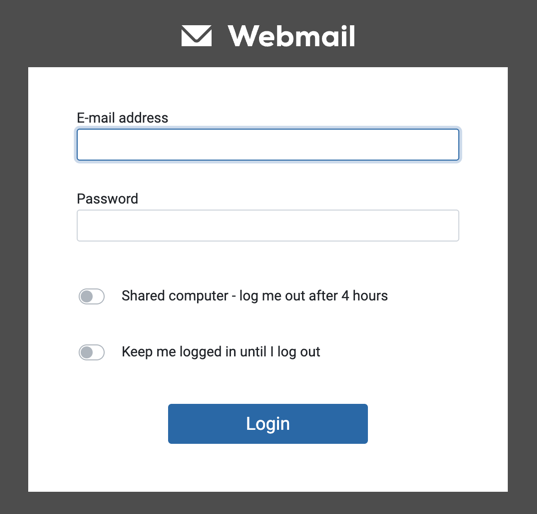
Enter your full email address and email password in the login form, then select the Login button. You will be logged in if the details are correct.
Always check that the login page address shown in your browser's address bar is correct before entering your email address or password. It is best to type the address manually or use a trusted saved bookmark. Avoid logging in through links received in emails or text messages, as they may be fake links designed to steal your account details.
Login form fields
The email login form shown above contains the following fields and options:
- E-mail address: Enter your full email address.
- Password: Enter your email password.
- Shared computer: Select this option when using a computer shared with other people. Your login session will end automatically after four hours for additional protection.
- Keep me logged in until I log out: Select this option to stay logged in until you log out yourself. This option is suitable when using your own device and will keep you logged in even after you close the browser.
If two-factor authentication is enabled
If Two-Factor Authentication is enabled on your account, another box will appear after you enter the correct email address and password and select the login button. This box asks you to enter your two-factor authentication code, as shown below:
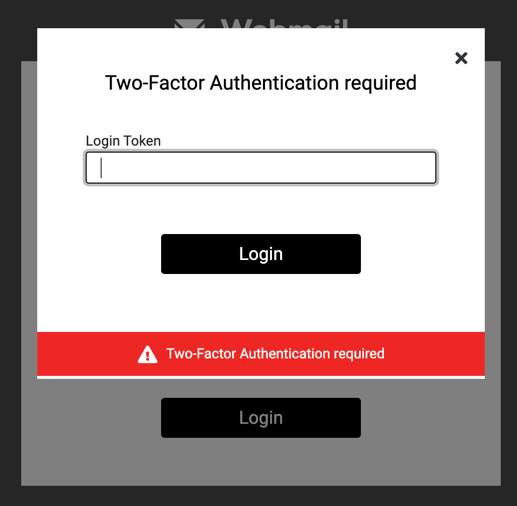
Enter the correct two-factor authentication code for your account. The code is generated by the authenticator app you use for two-factor authentication.
Two-factor authentication adds an extra layer of protection to your email account. Even if your password is exposed or compromised, nobody can log in to your account without the two-factor authentication code generated by the app on your mobile phone.